Web Scraping text data with Scrapy and Beautiful Soup
Summary. There is a wealth of information available on the internet. Web scraping is the process which enables people to collate and start to organise this data into a more structured format for further analysis. This project investigates this process using data provided by the UK Parliment, in particular the financial interests of members of the House of Commons. Attributes of the html data motivate the use of two Python libraries, Beautiful Soup and Scrapy, for this work.
Skills used:
- Programming (Python: Requests, Beautiful Soup and Scrapy libraries).
- Dichipering html mark-up (firefox 'Inspect Element' feature).
Introduction/ Data Used
The contents page for the data set chosen for this project is located on the UK Parliment publications webpage [1] and was motivated for use as a data cleaning project on Rachael Tatman's blog [2]. The data essentially lists the financial interests of all the members of the House of Commons. This data set was chosen for several reasons:- The data for each member is provided on a separate web page using different text formats.
- The data provided for each member is not uniform in format and different data is provided under different data fields.
Extracting information for a single member
In order to get a better understanding of the data the firefox browsers Inspect Element tool was used to inspect the HTML mark-up. A number of examples of different members individual pages were first inspected using this method. The first thing that became apparent is that there is some consistency in the data accross all members records. In particular, all of the members data is always contained within a \( < \) div \( > \) tag with an id of 'mainTextBlock'. In addition, all the members data is contained within paragraph (\( < \) p \( > \)) tags. The name and contituency information is contained within the first \( < \) strong \( > \) tag within the \( < \) div \( > \) tag as described earlier. The data is also grouped according to a numbered category, i.e. 1. Employment and Earnings, which are found in the subsequent \( < \) strong \( > \) tags inside a \( < \) p \( > \) tag. An example of this is shown in Figure 1, which shows an example of one of the members pages and its html from the Inspect element tool (note - names have been removed to respect the members privacy).
Figure 1: Example of one of the members html pages involving two identations of class Indent1 and Indent2.

It illustrates one example of the format of the data contained for members between the category information. In this instance, a first piece of detail is provided in a \( < \) p \( > \) tag of class indent. Within this exists a second set of independant/ listed statements, related to or coming under the previous \( < \) p \( > \) indent tag. These are within a \( < \) p \( > \) tag of class indent2 as shown. The data continues in another category, 8. Miscellaneous , being listed in the first level of detail \( < \) p \( > \) tag of class indent, which again stores independent elements but which come under that category.
A second example of how a members data is organised is shown in Figure 2. In this case \( < \) p \( > \) tags with a class indent are again used inside category information (as detailed previously), listing separate information points under that category. However, the format of information inside the \( < \) p \( > \) indent tag is different, consisting of separate text statements with a subject identifiable before the : (i.e. Name of Donor) and a description after, separated by \( < \) br \( > \) statements.
Figure 2: Example of one of the members html pages involving statements separated by

On further inspection of other members records it became clear that combinations of the layouts described above exist, making it important that whatever method was used to extract the information, that it be able to loop through the elements one by one, and depending on what the sequence is, process the data accordingly.
Getting access to the html
The Requests library [3] was used to send HTTP requests to the website page discussed previously.Python library used: Beautiful Soup
The Beautiful Soup [4] library was used to come up with a procedure to extract data from individual pages once the structure had been identified, as explained previously.
Extracting information for multiple members
Python library used: Scrapy
The library Scrapy [5] was used to automate retrival of the information accross multiple webpages. In essense the code created for use with individual pages with Beautiful Soup was pasted in the parse method within the Scrapy project created for this analysis and the response text used for further analysis of the html. Different Scrapy Field objects were created to store relevant data elements found using Beautiful Soup and these then processed with the yield method. Output was directed to csv with the delimiter set to a character unused in the text (#), following the instructions provided by [6].
Output
A screenshot showing the retreived data in csv format is shown in Figure 3. Data has been successfully scraped from the webpage intended, accross multiple web pages for different members with widely varying formats and with data captured into various columns. Name and category data are self explanatory. The detail column contains data from within the \( < \) p \( > \) tags of class indent, each a separate item under a specific category so in a unique row. Data within the \( < \) p \( > \) tags of class type indent 2 is shown in the DetailTwo column. Again if a list of items exists, because these refer to separate items, they are displayed on a separate row.Figure 3: Example output of csv format.
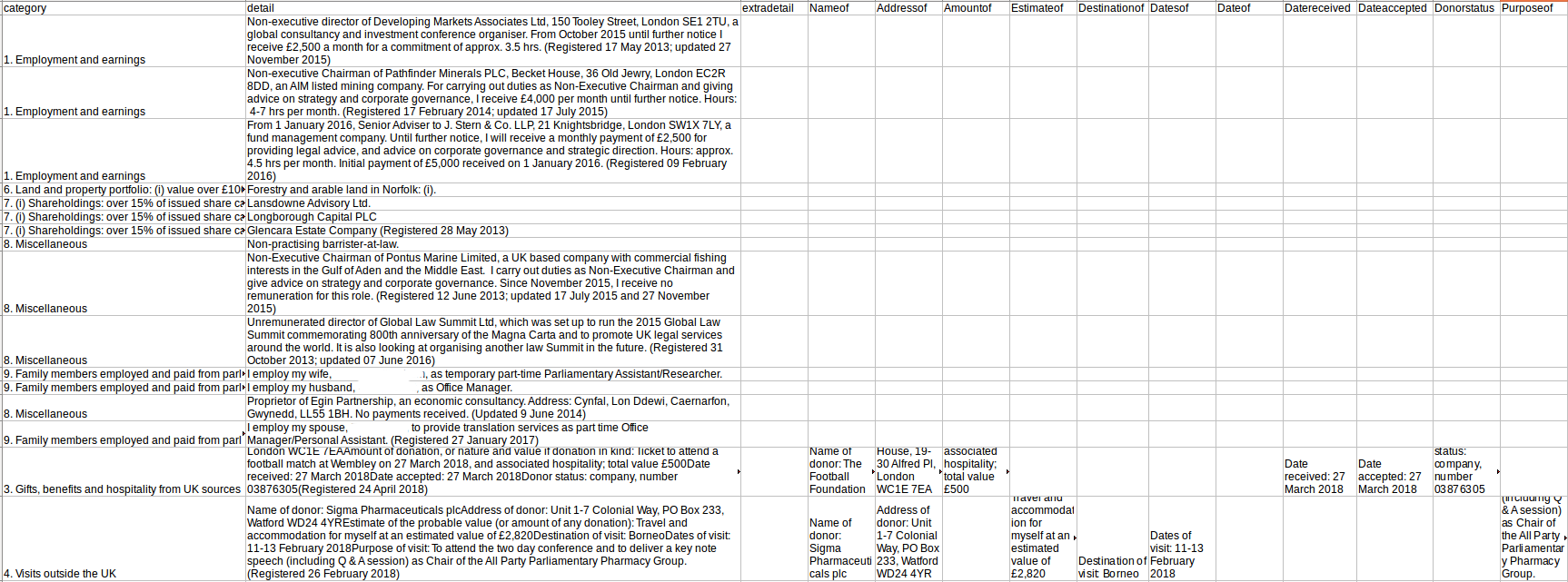
Data contained within specifically named elements in a list, with the name before the :, are separated into separate columns, named according to the information before the :.
Further modifications
Clearly the data as shown in its csv format would need further processing before any serious analysis could be done. For example, there is some level of duplication of data which would need to be removed. In particular in its current state when data is contained in a list in \( < \) p \( > \) tags between \( < \) br \( > \) tags, this information although separated into columns, is also shown in the detail column. The most crucial next step in processing this data however, would be trying to find a way in which to further evaluate and group the data in the detail column, as it currently contains a series of strings. This would most obviously be done using key word identification to group related data into further columns.
Bibliography
- UKParliament. The Register of Members' Financial Interests As at 13 August 2018, House of Commons Publications, 2018.
- R. Tatman. Making Noise and Hearing Things, Blog, 2018.
- K. Reitz. Requests: HTTP for Humans, Requests, 2018-06-14.
- L. Richardson. Beautiful Soup 4., Beautiful Soup, 2017-05-07.
- Scrapinghub. Scrapy: An open source and collaborative framework for extracting the data you need from websites. In a fast, simple, yet extensible way., Scrapinghub Ltd, 2018-07-12.
- jbinfo. jbinfo @ github, github, 2014.